
Most accessibility audits stop at color contrast ratios and missing alt text. Cognitive accessibility, the part that determines whether a person with ADHD, dyslexia, or anxiety can actually understand and use your site, rarely shows up in automated scan results. The gap between passing a WCAG technical check and genuinely serving every visitor is where user feedback becomes your most reliable compliance tool. This article walks through exactly how to collect, document, and act on that feedback so your organization can demonstrate real cognitive accessibility compliance.

- Automated tools catch roughly 30% of accessibility issues; cognitive barriers require human feedback to surface.
- Structured user feedback loops let you identify compliance gaps, document remediation for audits, and iterate continuously.
- Integrating feedback into your design and development process turns compliance from a one-time checkbox into an ongoing practice that reduces legal risk and improves user experience.
Why cognitive accessibility compliance matters
WCAG 2.2 introduced several success criteria that touch cognitive function: consistent help (3.2.6), redundant entry (3.3.7), and accessible authentication (3.3.8). The European Accessibility Act, enforceable since June 2025, extends obligations to private-sector digital products across the EU. Section 508 in the US already covers federal agencies, and ADA litigation targeting websites continues to climb year over year.
That number tells the story. Automated scanners handle structural HTML, contrast, and ARIA attributes well. They cannot tell you that a user with cognitive fatigue abandoned a form because the error messages were ambiguous, or that someone with dyscalculia could not parse a pricing table. Those insights come from people.
Cognitive accessibility refers to making digital content perceivable, understandable, and operable for users with cognitive and learning disabilities. It covers plain language, predictable navigation, clear error recovery, and reduced cognitive load. Compliance means meeting the relevant legal and standards-based requirements for these areas, and being able to prove it.
"Many struggle to keep up with evolving web accessibility laws and cognitive accessibility nuances.">, Best Strategies for Cognitive Accessibility in Digital Design
Ignoring cognitive accessibility does not just create legal exposure. It excludes a significant portion of your audience. Roughly 15-20% of the global population has some form of learning or cognitive disability. When you add situational impairments like stress, multitasking, or unfamiliar language, the number grows substantially.
How user feedback reveals compliance gaps

Automated scans produce binary results: pass or fail on specific criteria. User feedback produces context. A scan cannot flag that your checkout flow uses jargon that confuses first-time buyers. A user can.
Here is what feedback surfaces that tools miss:
- Confusing language in instructions, labels, and error messages
- Unpredictable navigation patterns that break mental models
- Overwhelming layouts with too many competing elements
- Inconsistent terminology across pages (e.g., "cart" on one page, "basket" on another)
- Time pressure from session timeouts that do not warn users or allow extensions
- Authentication barriers like CAPTCHAs that block users with cognitive disabilities
The compliance value of feedback is not just in finding problems. It is in documenting that you found them, acted on them, and verified the fix. That cycle is what regulators and auditors look for when evaluating due diligence.
Effective methods for collecting feedback
Not all feedback is equally useful for compliance. You need structured approaches that produce actionable, documentable results.
Usability testing with diverse participants is the gold standard. Recruit participants who have cognitive and learning disabilities, including ADHD, dyslexia, autism spectrum conditions, and anxiety disorders. Run task-based sessions where participants complete real workflows on your site. Record where they hesitate, misunderstand, or abandon tasks.
On-site feedback widgets capture in-context reactions. Place a simple "Was this page easy to understand?" prompt on key pages. Keep the interaction minimal: a thumbs up/down or a 1-5 scale, with an optional text field. Tools like Hotjar, Qualaroo, or custom implementations work here.
Post-task surveys ask users to rate clarity, ease of navigation, and confidence in completing their goal. Use the System Usability Scale (SUS) or the Single Ease Question (SEQ) for standardized, comparable data.
Accessibility-specific feedback channels give users a dedicated way to report barriers. A visible "Report an accessibility issue" link in your footer signals commitment and collects targeted reports.
A tool like PagePerson Insights can complement these methods by analyzing pages for cognitive load indicators and flagging areas where user feedback collection would be most valuable.
Documenting feedback for audits

Collecting feedback without documenting it properly wastes the compliance value. Regulators under the European Accessibility Act and ADA enforcement expect organizations to show a process, not just a snapshot.
Every piece of feedback should be logged with:
- Date and source (usability test, widget, support ticket)
- Page or flow affected
- User description of the barrier
- Mapped WCAG success criterion (e.g., 3.1.5 Reading Level, 3.3.3 Error Suggestion)
- Severity rating (critical, major, minor)
- Remediation action taken
- Date of fix and verification method
| Ad-Hoc Documentation | Structured Compliance Log |
|---|---|
| Scattered across emails and Slack | Centralized in one system |
| No WCAG mapping | Each issue linked to criteria |
| Hard to produce for auditors | Audit-ready reports on demand |
| Fixes unverified | Verification date and method recorded |
| No trend analysis | Patterns visible over time |
The structured approach takes more effort upfront. It saves significant time when an auditor asks for evidence of your accessibility process, or when legal counsel needs to demonstrate due diligence.
Building continuous feedback loops

One-time audits produce one-time compliance. Regulations like the European Accessibility Act expect ongoing conformance. That means your feedback process needs to be continuous, not annual.
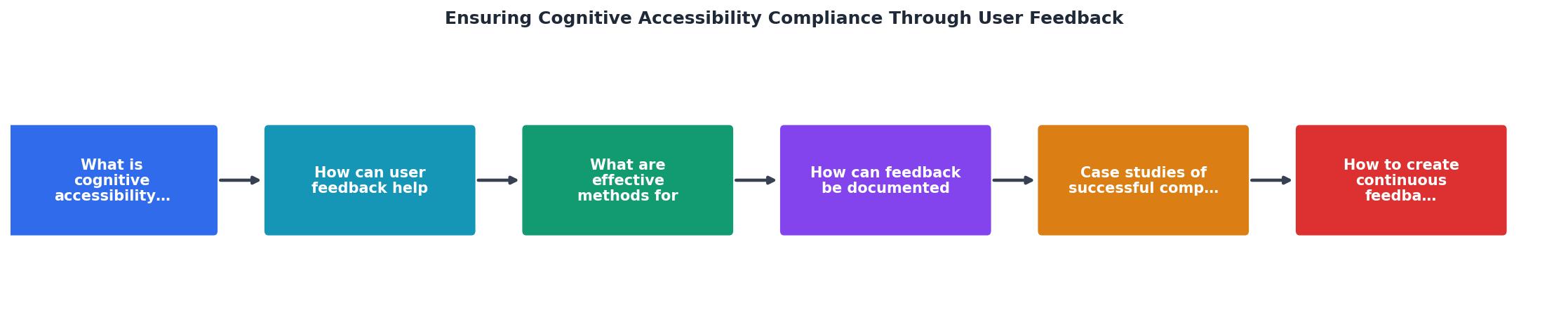
The diagram shows the core loop: Gather feedback, Analyze gaps, Prioritize fixes, Implement changes, Verify improvements, Document results. Then repeat. Each step feeds the next, and the documentation step feeds back into the gathering step by informing what to test next.
Here is how to operationalize each step:
- Gather feedback on a rolling basis. Run quarterly usability tests. Keep on-site widgets active permanently. Review support tickets monthly for cognitive barrier patterns.
- Analyze gaps by mapping reported issues to WCAG criteria and scoring severity. Look for clusters: if five users report confusion on the same form, that is a high-priority gap.
- Prioritize fixes using a risk matrix. Critical barriers on high-traffic pages go first. Legal exposure (e.g., pages covered by specific regulations) elevates priority.
- Implement changes in your normal development cycle. Tag accessibility fixes in your version control so they are traceable.
- Verify improvements by re-testing with users. Automated regression tests catch if a fix gets reverted, but only users confirm the cognitive barrier is actually resolved.
- Document results in your compliance log. Update your accessibility statement with the date of last review.
Quarterly cycles strike a balance between thoroughness and practicality. Organizations with frequent releases may want monthly reviews. The point is regularity, not perfection.
Real-world compliance through feedback
The UK Government Digital Service (GDS) built its accessibility approach around user research with disabled participants. Every major service on GOV.UK goes through rounds of usability testing that include participants with cognitive disabilities. The result: GOV.UK consistently ranks among the most accessible government platforms globally, and the documented research process serves as compliance evidence.
In the private sector, the BBC's accessibility team runs ongoing user testing with participants who have a range of disabilities, including cognitive conditions. Their published accessibility standards explicitly address cognitive load, reading level, and navigation predictability. Feedback from these sessions directly shapes their design guidelines.
Financial services firms under the European Accessibility Act have started embedding cognitive accessibility testing into their QA processes. One approach gaining traction: pairing automated PagePerson Insights scans for cognitive load indicators with monthly user feedback reviews. The automated layer catches regressions quickly; the human layer catches the nuanced barriers that code cannot detect.
The following interactive element shows an example compliance dashboard that tracks feedback-driven improvements over a typical quarter.
Q2 Compliance Feedback Dashboard
Steps to ensure compliance
The following checklist integrates user feedback into your accessibility compliance process. Each item maps to a concrete action you can assign, track, and document.
Cognitive Accessibility Compliance Checklist
Your progress is saved automatically in your browser.
Organizations that follow this process consistently reach remediation rates above 80% per quarter. The remaining issues typically require larger design changes that span multiple release cycles.
FAQ
Frequently Asked Questions
Additional Resources
- Best Strategies for Cognitive Accessibility in Digital Design - Probable measures include offering clear feedback, understandable error messages, and straightforward instructions to facilitate the navigation ...
- Ten strategies and best practices for cognitive accessibility ... - Regularly updating digital content and conducting accessibility audits can help maintain and improve cognitive accessibility. Keeping up with ...
- Designing user interfaces for content simplification aimed at ... - Cognitive accessibility aims to make content more accessible for people with cognitive impairments, such as the elderly and people with intellectual and ...