
Every digital business loses money when visitors cannot understand the interface in front of them. Cognitive accessibility removes the comprehension barriers that cause bounces, abandoned carts, and wasted ad spend. When people actually understand what they see, they convert, they stay, and they spend less time contacting support. This article breaks down exactly how cognitive accessibility drives economic growth across digital industries and what you can do about it today.

- Cognitive accessibility directly increases conversion rates by making digital products understandable to a broader audience, including the estimated 15-20% of people with cognitive differences like ADHD, dyslexia, or anxiety.
- Companies that invest in cognitive accessibility see reduced support costs, higher customer retention, and lower customer acquisition costs.
- The economic impact compounds: clearer interfaces attract more users, reduce churn, and turn existing traffic into revenue without increasing ad budgets.
What cognitive accessibility actually means
Most people hear "accessibility" and think screen readers, alt text, and color contrast. Those matter. But cognitive accessibility targets a different layer: whether a person can understand what they see, process the information, make decisions, and complete tasks without confusion or cognitive overload.
This includes:- Clear language that does not require a graduate degree to parse
- Predictable navigation so users know where they are and what to do next
- Reduced cognitive load through simplified layouts and focused content
- Error prevention and recovery that does not punish mistakes
How it improves engagement

User engagement is not about flashy animations or gamification tricks. It starts with comprehension. If a visitor lands on your SaaS homepage and cannot figure out what the product does within 8 seconds, they leave. Cognitive accessibility fixes that gap.
Here is what happens when you simplify:
- Time on page increases. Users who understand the content keep reading. Users who are confused bounce.
- Click-through rates improve. Clear calls to action with unambiguous labels get clicked. Vague buttons like "Get Started" with no context get ignored.
- Form completion rates rise. Forms with plain-language labels, inline validation, and logical field ordering see completion rates jump significantly.
- Return visits grow. People come back to sites that felt easy to use. They avoid sites that made them feel stupid.
Reducing operational costs

Support tickets are expensive. Every confused user who emails "How do I cancel?" or "Where is my order?" costs $5-15 in support labor. Multiply that by thousands of users per month and you have a budget line item that cognitive accessibility can shrink.
The connection is direct:
- Confusing interfaces generate support tickets. If users cannot find the settings page, they contact support. If the error message says "Error 403," they contact support. If the pricing toggle between monthly and annual is unclear, they contact support.
- Clear interfaces reduce tickets. Plain-language error messages ("Your password needs at least 8 characters") eliminate an entire category of support requests. Visible navigation labels cut "where do I find X?" tickets.
- Self-service improves. Knowledge bases written at accessible reading levels get used. Knowledge bases written in dense technical jargon get ignored, and users call instead.
One B2B SaaS company, Basecamp, has long prioritized plain language and simple interfaces. Their support team is famously small relative to their user base. That is not an accident. When the product explains itself, fewer people need help.
The math works like this: if cognitive accessibility improvements reduce support volume by even 20%, and your support costs run $50,000/month, that is $120,000 saved annually. No new features required. No new hires. Just clearer words and better layouts.
Impact on acquisition and retention
Customer acquisition cost (CAC) drops when your website converts better. If you spend $10,000 on ads driving 10,000 visitors and convert 2% (200 customers), your CAC is $50. Improve conversion to 3% through cognitive accessibility fixes, and your CAC drops to $33. Same ad spend, 50% more customers.
Retention follows the same logic. Users who understand your product:- Activate faster (they complete onboarding without getting stuck)
- Use more features (they discover functionality because navigation is clear)
- Churn less (they get value, so they stay)
The following diagram shows how cognitive accessibility improvements flow through the business:
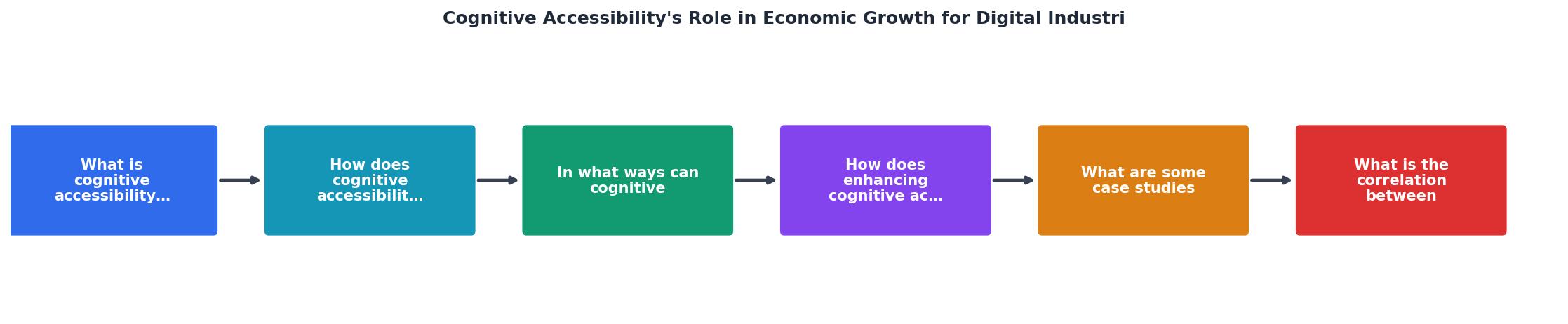
The steps are straightforward: Audit your current cognitive barriers, Simplify language and layouts, Test with real users including those with cognitive differences, Measure conversion and support metrics, and Iterate based on data.
Companies already winning with this

Real examples beat theory. Here are companies and sectors where cognitive accessibility created measurable economic impact:
- GOV.UK rewrote all government service pages in plain English at a reading level accessible to 90% of the population. Result: task completion rates increased, call center volume dropped, and digital service adoption grew. The UK Government Digital Service estimated savings in the hundreds of millions of pounds.
- Booking.com runs thousands of A/B tests annually, many focused on reducing cognitive load in the booking flow. Simplified date pickers, clearer pricing breakdowns, and reduced decision fatigue from fewer options per screen all contributed to higher booking completion rates.
- Mailchimp built its brand on accessible, jargon-free language. Their style guide explicitly bans technical terms when simpler alternatives exist. This approach helped them grow to millions of users, many of whom are small business owners without technical backgrounds.
- Banking apps like Monzo and Chime gained market share partly by replacing traditional banking jargon with plain language. "Your balance" instead of "Available funds." "You spent £42 on groceries" instead of "POS DEBIT TESCO STORES 2847."
"Data privacy concerns will necessitate robust protection measures, and accuracy and reliability will be crucial to prevent misinformation.">, Medium
As AI-driven interfaces become more common, cognitive accessibility grows even more critical. Chatbots, recommendation engines, and automated workflows all need to communicate clearly or they create confusion at scale.
Support costs and cognitive clarity
The correlation between cognitive accessibility and decreased customer support expenses is not theoretical. It is measurable.
Here is a typical pattern:
| Before Cognitive Accessibility | After Cognitive Accessibility |
|---|---|
| 500 support tickets/week | 300 support tickets/week |
| Average resolution: 12 min | Average resolution: 8 min |
| Monthly support cost: $40,000 | Monthly support cost: $22,000 |
| NPS score: 32 | NPS score: 51 |
- Fewer "how do I?" questions because the interface answers them visually
- Fewer error-related tickets because error messages explain what went wrong and how to fix it
- Fewer billing/pricing questions because pricing pages are unambiguous
The following interactive card illustrates the economic impact of cognitive accessibility improvements for a typical digital business:
Economic Impact: Cognitive Accessibility
Implementation checklist
Getting started does not require a massive redesign. Start with the highest-impact, lowest-effort changes and build from there.
Cognitive Accessibility Implementation Checklist
Your progress is saved automatically in your browser.
FAQ
Frequently Asked Questions
Additional Resources
- Cognitive Accessibility (Digital) in 2026 - Minnesota.gov - Cognitive accessibility plays an essential role in ensuring people with cognitive disabilities can equitably access digital government services.
- The Cognitive Economy: AI-Driven Disruption - The Cognitive Economy represents a transformative phase in economic development, driven by the integration of artificial intelligence with ...
- The impact of digital industry development on regional ... - PMC - The research results indicate that the development of the digital industry can effectively enhance regional economic resilience.