
You spend thousands on paid traffic, obsess over keyword rankings, and still watch bounce rates climb. The problem often has nothing to do with your SEO strategy and everything to do with what happens after the click. When visitors land on a page they cannot quickly understand, they leave, and Google notices. Cognitive accessibility fixes the comprehension gap, and it turns out those same fixes send strong positive signals to search engines.

- Cognitive accessibility improvements (clearer copy, simpler navigation, reduced cognitive load) directly improve the user-engagement metrics Google uses for ranking.
- Readable, well-structured content earns longer dwell times, lower bounce rates, and more featured-snippet placements.
- Aligning accessibility work with SEO goals creates a compounding loop: better comprehension leads to better engagement, which leads to better rankings, which brings more traffic you can actually convert.
Where accessibility meets search
Search engines stopped being keyword-matching machines years ago. Google's helpful content system, passage ranking, and Core Web Vitals all reward pages that genuinely serve the person who clicked. Cognitive accessibility is the practice of designing content and interfaces so people with varying cognitive abilities, attention spans, literacy levels, and mental states can understand and act on what they see.
The overlap with SEO is not accidental. Google measures dwell time, pogo-sticking (bouncing back to search results), scroll depth, and interaction patterns. A page that confuses visitors produces bad numbers on every one of those metrics. A page that reduces cognitive load, uses plain language, and guides the eye through a logical hierarchy produces good numbers.
That statistic alone should reframe how you think about SEO budgets. Nearly four in ten visitors abandon a page not because the content is wrong, but because the presentation overwhelms them. Every one of those exits tells Google the page did not satisfy the query.
Content readability drives rankings
Readability is the single biggest lever where cognitive accessibility and SEO share the same toolkit. Here is what that looks like in practice:
- Short sentences and paragraphs. Aim for an average sentence length under 20 words. Paragraphs of 2-4 sentences scan faster than dense blocks.
- Plain language. Replace jargon with everyday words. "Use" instead of "utilize." "Start" instead of "initiate." Flesch-Kincaid scores between grade 6 and 8 correlate with higher engagement across most B2B and B2C sites.
- Descriptive headings. H2 and H3 tags that contain the question a reader is asking help Google extract featured snippets and help readers with ADHD or anxiety find the section they need.
- Consistent terminology. Using three different words for the same concept confuses readers and dilutes keyword relevance simultaneously.
Sites that rewrote their top landing pages for plain language and clear structure have reported dwell-time increases in the range of 50-80%. The reason is straightforward: people stay when they understand.
Engagement signals that matter

Google does not publish a list of "engagement ranking factors," but the evidence from algorithm updates and leaked documents points to several signals that cognitive accessibility directly improves:
- Bounce rate / pogo-sticking. When a user clicks your result, gets confused, and hits back, that is a negative signal. Clear content structure and scannable layouts reduce this.
- Time on page. Visitors who can follow your argument stay longer. Longer sessions correlate with higher rankings for informational queries.
- Click depth. Intuitive navigation and clear calls to action encourage visitors to explore more pages. Internal linking works better when the link text and destination match what the reader expects.
- Scroll depth. If your page buries the answer under a wall of text, readers leave before reaching it. Cognitive accessibility principles say: answer first, elaborate second. That is also how featured snippets work.
"The accessibility checks directly contribute to SEO improvements in several key ways.">, Enhancing SEO Through Web Accessibility
The following dashboard illustrates how cognitive accessibility improvements map to SEO-relevant engagement metrics. These numbers represent a typical scenario for a SaaS landing page before and after applying readability and navigation fixes:
Accessibility → SEO Impact
Strategies that serve both goals

Here are specific strategies that improve cognitive accessibility and SEO at the same time:
Simplify page structure
Use a single H1 per page. Organize content in a logical H2 → H3 hierarchy. This helps screen readers, helps readers who scan, and helps Googlebot understand your content tree. Avoid "creative" layouts that scatter related information across disconnected sections.
Write answer-first content
Put the core answer in the first paragraph of each section. Readers with attention difficulties get what they need immediately. Google can extract that answer for a featured snippet. Everyone wins.
Use descriptive link text
Click here tells nobody anything. "Read the cognitive load marketing ROI guide" tells the reader and Google exactly what the destination contains. Descriptive anchor text is an accessibility requirement (WCAG 2.4.4) and an SEO best practice.
Reduce visual noise
Every animation, popup, auto-playing video, and sidebar widget adds cognitive load. Pages with fewer distractions keep visitors focused. They also load faster, which directly improves Core Web Vitals scores. Lighthouse performance and accessibility audits often flag the same offending elements.
Add structured data
Schema markup (FAQ schema, HowTo schema, Article schema) helps search engines parse your content. It also enforces a clear content structure that benefits readers with cognitive disabilities. If your content is organized enough for schema, it is organized enough for comprehension.
| Traditional SEO-Only Approach | Accessibility-Aligned SEO Approach |
|---|---|
| Keyword density focus | Reader comprehension focus |
| Long-form for word count | Concise, scannable sections |
| Generic meta descriptions | Descriptive, plain-language summaries |
| Link building as primary tactic | Content clarity as primary tactic |
| Ignores cognitive load | Actively reduces cognitive load |
| Optimizes for bots | Optimizes for humans (bots follow) |
Step-by-step optimization process
This process diagram shows how to align cognitive accessibility improvements with your SEO workflow:
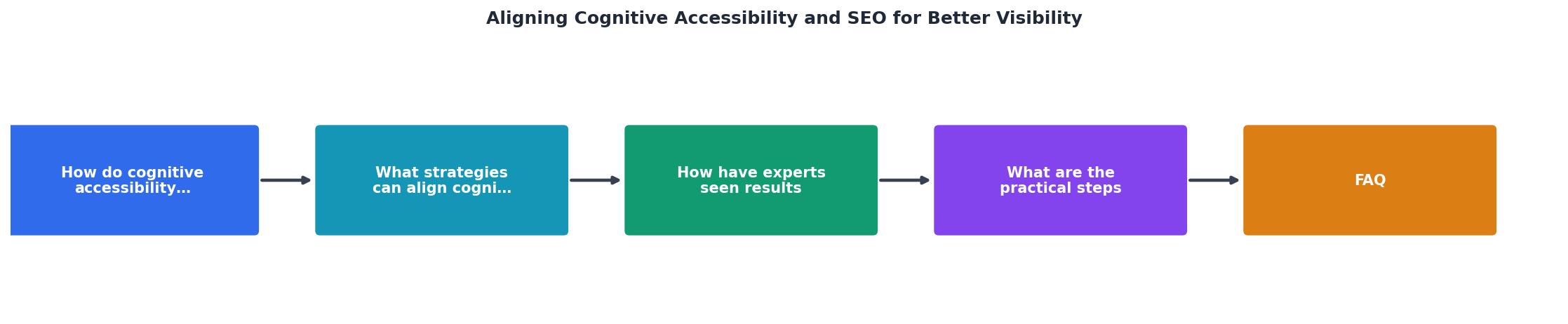
The steps break down like this:
- Audit readability. Score your top 10 landing pages with a readability tool. Flag anything above grade 9.
- Check cognitive load. Identify pages with excessive navigation options, competing CTAs, or dense text blocks. Tools like PagePerson Insights can surface specific comprehension barriers that analytics alone miss.
- Simplify content. Rewrite flagged pages using plain language, shorter paragraphs, and answer-first structure.
- Fix navigation. Reduce menu items, add breadcrumbs, use descriptive labels.
- Add structure. Implement proper heading hierarchy and schema markup.
- Measure impact. Track bounce rate, dwell time, scroll depth, and rankings for 30 days.
- Iterate. Focus next on the pages with the highest traffic but lowest engagement.
Cognitive Accessibility SEO Optimization Checklist
Your progress is saved automatically in your browser.
FAQ
Frequently Asked Questions
What is the first page on your site you would rewrite for cognitive accessibility, and what makes it the priority?