
Trust does not come from a privacy policy page or a badge in the footer. It comes from the moment a visitor lands on your site and can actually understand what you offer, how to get it, and what happens next. Organizations that invest in cognitive accessibility send a clear signal to users and regulators alike: we designed this for you, not just for ourselves. That signal compounds over time into measurable loyalty, reduced legal exposure, and stakeholder confidence that goes far beyond checkbox compliance.

- Cognitive accessibility directly builds user trust by making digital experiences understandable, predictable, and respectful of diverse cognitive needs.
- Demonstrating inclusion through concrete design choices gives stakeholders documentable evidence of due diligence.
- These efforts reduce legal and regulatory risk under ADA, Section 508, EN 301 549, and the European Accessibility Act while genuinely improving the experience for everyone.
Why cognitive accessibility drives trust
Most accessibility programs stop at contrast ratios, alt text, and keyboard navigation. Those checks matter, but they miss the layer where trust actually forms: comprehension. A user who cannot parse your navigation, decode your form labels, or predict what a button does will not trust your organization, no matter how many WCAG AA badges you display.
Cognitive accessibility addresses how people process, understand, and remember information. It covers plain language, consistent layouts, predictable interactions, error prevention, and reduced cognitive load. When these elements work, users feel competent and in control. When they fail, users feel confused, anxious, and suspicious.
That number is not abstract. It represents real people closing tabs because a checkout flow used ambiguous labels, a government form buried critical instructions, or a healthcare portal required three clicks to find a phone number. Each departure erodes trust, and each erosion is preventable.
Consider the difference between a bank that labels a button "Submit Application" versus one that labels it "Continue." The first tells users exactly what will happen. The second leaves them guessing. Cognitive accessibility is the discipline of eliminating that guesswork across every touchpoint.
Strategies that demonstrate inclusion

Saying "we care about accessibility" means nothing without visible, repeatable actions. Here are strategies that translate intention into trust:
- Use plain language by default. Write at a reading level your broadest audience can follow. The UK Government Digital Service targets a reading age of 9. The US Plain Writing Act requires federal agencies to use clear communication. Apply the same standard to your product copy, error messages, and onboarding flows.
- Make navigation predictable. Place primary navigation in the same location on every page. Use descriptive labels ("Account Settings," not "Preferences"). Avoid hamburger menus on desktop where screen space allows full navigation.
- Provide clear feedback on every action. When a user submits a form, confirm it immediately with a visible success message. When an error occurs, explain what went wrong and how to fix it in the same location where the error happened.
- Reduce memory demands. Do not force users to remember information from a previous page. If a multi-step process references earlier input, display that input on the current step.
- Test with diverse cognitive profiles. Include participants with ADHD, dyslexia, anxiety disorders, and low digital literacy in usability testing. Their feedback reveals friction that analytics alone cannot surface.
These strategies are not expensive. They require discipline, not budget. And each one produces an artifact (a documented decision, a test result, a before/after comparison) that compliance leads can reference during audits.
Trust-building in practice

Real organizations have turned cognitive accessibility into a trust advantage. Here are patterns worth studying:
GOV.UK rebuilt its entire digital presence around plain language and consistent patterns. Every government service follows the same interaction model: one thing per page, clear headings, explicit calls to action. The result is a platform that millions of people with varying literacy levels use successfully every day. Trust in digital government services in the UK increased measurably after the redesign.
Barclays invested in an accessibility team that goes beyond technical compliance. Their "Digital Eagles" program trains staff and publishes accessible design guidelines that explicitly address cognitive needs. The bank publishes its accessibility statement prominently, not buried in a footer link three levels deep.
The BBC maintains detailed accessibility guidelines that include cognitive considerations: reading level targets, guidance on animation and motion, and rules for consistent navigation. Their iPlayer platform uses predictable layouts and clear labeling that reduce cognitive load for all users, not just those with diagnosed conditions.
"Creating beautiful and innovative designs is a key goal for graphic designers.">, Accessibility and Trust in UX Design
The common thread across these examples: none of them treated cognitive accessibility as a separate project. They embedded it into their standard design and content processes. That integration is what makes the trust signal authentic rather than performative.
The trust-building process
This is where cognitive accessibility efforts translate into measurable trust. The process is not linear, but it follows a repeatable cycle that compliance teams can document and stakeholders can verify.
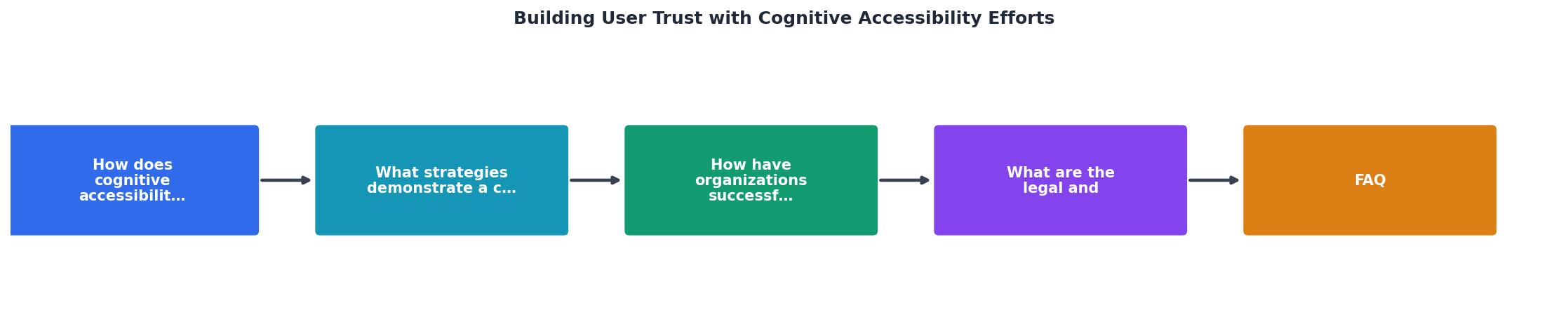
The diagram shows five connected steps: Audit existing content and flows for cognitive barriers, Identify specific friction points (ambiguous labels, memory demands, unpredictable navigation), Redesign using plain language and consistent patterns, Test with diverse cognitive profiles, and Document changes for compliance and stakeholder reporting. Each cycle produces evidence that feeds the next audit.
The key insight: trust is not a one-time achievement. It compounds through repeated cycles of improvement and documentation. Every audit report that shows progress gives stakeholders concrete proof that the organization takes inclusion seriously.
Here is an example dashboard showing how a typical mid-size organization might track trust-related cognitive accessibility metrics across a quarterly review cycle:
Quarterly Cognitive Accessibility Trust Metrics
These numbers tell a story that executives and regulators both understand: fewer confused users, fewer complaints, more completed tasks. That is trust, measured.
Legal and regulatory benefits

Cognitive accessibility is no longer a "nice to have" in the regulatory landscape. Several frameworks now explicitly or implicitly require it:
- WCAG 2.2 includes success criteria directly relevant to cognitive accessibility: 3.3.7 Redundant Entry (AAA), 3.2.6 Consistent Help (A), and the longstanding 3.1.5 Reading Level (AAA). The Cognitive and Learning Disabilities Accessibility Task Force (COGA) at W3C continues to push for stronger cognitive requirements in future WCAG versions.
- The European Accessibility Act (EAA), effective June 2025, requires products and services to be "understandable" and "perceivable." That language covers cognitive accessibility, not just sensory or motor accessibility.
- ADA Title III lawsuits in the United States increasingly reference usability and comprehension barriers, not just screen reader compatibility.
- Section 508 (US federal) and EN 301 549 (EU) both reference WCAG, pulling cognitive criteria into procurement requirements.
The legal trend is clear: organizations that ignore cognitive accessibility face growing exposure. But the flip side is equally important. Organizations that document their cognitive accessibility efforts create a defensible record of due diligence. If a complaint or lawsuit arises, that record demonstrates good faith and systematic effort.
Tools like PagePerson Insights can accelerate this process by identifying cognitive barriers across pages at scale, giving compliance teams repeatable audit data they can include in regulatory documentation.
| Without Cognitive Accessibility | With Cognitive Accessibility |
|---|---|
| Ambiguous error messages | Clear, actionable error guidance |
| Inconsistent navigation patterns | Predictable, labeled navigation |
| High reading level copy | Plain language at target grade level |
| No documented audit trail | Repeatable, documented audit cycles |
| Reactive legal defense | Proactive due diligence record |
| User confusion drives support costs | Reduced support tickets and complaints |
Implementing trust-building efforts
The checklist below gives compliance and accessibility leads a concrete starting point. Each item produces a documentable artifact that serves both user trust and regulatory defense.
Trust-Building Cognitive Accessibility Checklist
Your progress is saved automatically in your browser.
FAQ
Frequently Asked Questions
What cognitive accessibility change has made the biggest difference in how your users perceive your organization? Share your experience below.
Additional Resources
- Accessibility and Trust in UX Design - Accessibility and trust in UX design means creating digital experiences that everyone can use comfortably and confidently, regardless of abilities or ...
- Adapting UX research for neurodiversity and cognitive ... - It talks about the importance of user testing to better consider cognitive accessibility needs throughout the product development lifecycle.
- Barriers to creating value with cognitive accessibility features ... - This paper aims to identify service providers' perceptions of barriers to designing cognitively accessible digital services.