
Most teams treat cognitive accessibility as a nice-to-have checkbox buried at the bottom of a sprint backlog. The result is websites that pass automated WCAG scans with flying colors yet leave a significant chunk of visitors confused, overwhelmed, or unable to complete basic tasks. The challenges are real but they are not mysterious, and every single one of them has a practical workaround that fits inside a normal product workflow.

- Cognitive accessibility stalls because of misconceptions (it's too expensive, it only helps a niche audience, existing tools already cover it), organizational resistance, and a lack of clear ownership.
- Overcoming these barriers requires targeted stakeholder education, embedding cognitive checks into existing design workflows, and using evidence-based tools instead of gut feelings.
- Teams that push through these obstacles see measurable gains in usability, conversion, and regulatory compliance.
Why cognitive accessibility stalls
Contrast ratios, alt text, keyboard navigation. Those are the accessibility items most teams know how to handle. Cognitive accessibility sits in a different category entirely. It asks whether a visitor can understand the interface, not just perceive it. That distinction creates friction because comprehension is harder to measure, harder to automate, and harder to defend in a stakeholder meeting.
The number above is not hypothetical. A large portion of any audience includes people dealing with cognitive load issues, whether from ADHD, anxiety, dyslexia, low digital literacy, or simply being tired and distracted. When a product team ignores cognitive accessibility, they ignore a segment of users that overlaps heavily with their paying customers.
Three forces keep teams stuck:
- Misconceptions about what cognitive accessibility means and who it serves.
- Organizational resistance rooted in budget concerns and competing priorities.
- Tooling gaps that make cognitive issues invisible in standard audits.

Misconceptions that block progress
The biggest barrier is not technical. It is what people believe about cognitive accessibility before they start working on it. Here are the myths that show up in almost every organization:
- "It only affects people with diagnosed disabilities." Wrong. Cognitive load problems hit anyone under stress, multitasking, or using a device in a noisy environment. A confusing checkout flow does not care about a medical diagnosis.
- "Our automated accessibility tool already covers it." Tools like axe, WAVE, and Lighthouse check structural and visual WCAG criteria. They do not evaluate whether a sentence is too complex, whether a form label is ambiguous, or whether a multi-step flow creates excessive working memory demands.
- "It's too expensive to retrofit." Most cognitive accessibility improvements are content and layout changes, not engineering overhauls. Simplifying a heading, reducing options on a page, or rewriting a confusing error message costs almost nothing.
- "WCAG compliance means we're done." WCAG 2.2 includes some cognitive criteria (like consistent navigation and error identification), but the cognitive layer is still the least specified part of the standard. Passing an audit does not mean your site is cognitively accessible.
- "Users will tell us if something is confusing." They won't. They'll leave. Confused users rarely submit feedback; they bounce, and your analytics show a drop-off with no explanation.
"Many struggle to keep up with evolving web accessibility laws and cognitive accessibility nuances.">, Best Strategies for Cognitive Accessibility in Digital Design
These myths persist because cognitive accessibility lacks the clear pass/fail binary that visual accessibility has. A missing alt tag is objectively wrong. A confusing paragraph is subjectively wrong, and subjectivity makes people uncomfortable.
That low adoption rate is exactly why addressing cognitive accessibility now creates a competitive advantage. Most competitors are not doing it either.
Resistance inside organizations

Even when a designer or developer understands the problem, getting the rest of the organization on board is a separate challenge. Resistance typically comes from three directions:
Product managers worry about scope creep. Adding cognitive accessibility reviews to a sprint feels like another gate that slows down shipping. The counter-argument: catching a confusing flow before launch is cheaper than diagnosing a conversion drop after launch.
Engineering leads question the ROI. They want metrics, not principles. This is where evidence-based tools become critical. Instead of saying "this page feels confusing," you need data showing that specific elements create cognitive barriers. PagePerson Insights, for example, can surface exactly where comprehension breaks down on a page, giving you the kind of concrete evidence that engineering teams respond to.
Executives see accessibility as a legal checkbox, not a growth lever. Reframing cognitive accessibility as a conversion optimization strategy changes the conversation entirely. You are not asking for budget to "be more accessible." You are asking for budget to stop losing users who cannot figure out the product.
Here is a practical framework for moving past organizational resistance:
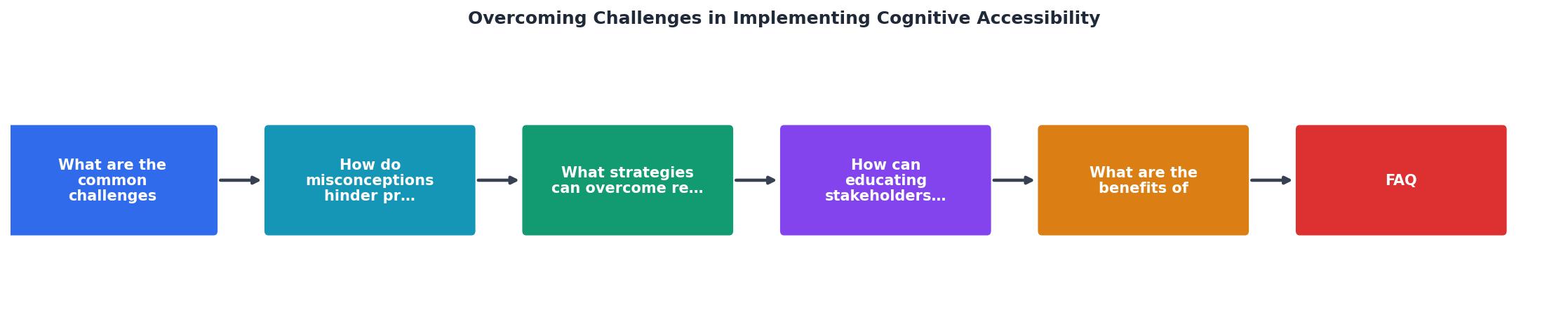
The diagram above outlines the core loop: Identify barriers in your current site, Gather evidence using cognitive accessibility tools, Educate stakeholders with that evidence, Implement fixes in your existing workflow, and Measure results to build the case for continued investment. Each step feeds the next.
Educating stakeholders effectively

Education is the single highest-leverage activity for long-term cognitive accessibility adoption. But "education" does not mean sending a Slack link to a WCAG document. It means structured, repeated exposure to the problem through formats that different stakeholders actually absorb.
For designers and developers:- Run a "cognitive walkthrough" session where the team uses the product while under artificial cognitive load (e.g., counting backwards from 100 by 7s while completing a signup flow). This makes the problem visceral.
- Share annotated screenshots showing specific cognitive barriers: ambiguous labels, walls of text, inconsistent navigation patterns.
- Integrate cognitive checks into design reviews the same way you check for responsive behavior or color contrast.
- Map cognitive barriers to funnel metrics. Show that the page with the highest drop-off also has the most complex language and the densest layout.
- Present A/B test results from simplified versions of key pages. Even small changes (shorter paragraphs, clearer CTAs, reduced choices) often produce measurable conversion lifts.
- Frame cognitive accessibility within the European Accessibility Act timeline and ADA litigation trends. Regulatory risk is a language executives understand.
- Show competitor analysis. If a direct competitor has a simpler, more cognitively accessible experience, that is a strategic threat worth addressing.
That number represents real revenue walking out the door. When stakeholders see it attached to their own product's analytics, the conversation shifts from "should we do this" to "how fast can we do this."
Building cognitive checks into workflows
The goal is not to create a separate cognitive accessibility process. It is to embed cognitive thinking into the processes you already run. Here is how that works in practice:
- Design phase: Add a cognitive accessibility section to your design checklist. Before any mockup moves to development, verify that reading level is appropriate, navigation is predictable, and the number of choices per screen stays manageable.
- Content review: Run key pages through a readability scorer. Aim for a Flesch-Kincaid grade level of 8 or below for consumer-facing content. Flag jargon, double negatives, and sentences longer than 25 words.
- QA/testing: Include at least one cognitive accessibility test case per feature. Example: "Can a first-time visitor complete this task without referring to help documentation?"
- Post-launch monitoring: Use tools like PagePerson Insights to continuously scan for cognitive barriers as content and features change. What was clear at launch can become confusing after six months of incremental updates.
Cognitive Accessibility Challenge Tracker
Benefits of pushing through
Teams that overcome these challenges report consistent improvements across three areas:
User experience quality. Pages become easier to scan, forms become easier to complete, and error recovery becomes less frustrating. These improvements benefit every user, not just those with cognitive disabilities. A clearer interface is a better interface, full stop.
Conversion and engagement. Reducing cognitive friction directly impacts completion rates. Simplified checkout flows, clearer value propositions, and predictable navigation patterns all contribute to higher conversion. The effect compounds: each page a user successfully navigates increases the likelihood they complete the next one.
Compliance posture. The European Accessibility Act (effective June 2025) and ongoing ADA litigation trends are expanding the definition of what "accessible" means. Teams that address cognitive accessibility now are ahead of the regulatory curve instead of scrambling to catch up.
That progress bar reflects a pattern seen across organizations that invest in structured education: once stakeholders see real data about cognitive barriers on their own product, resistance drops sharply.
Stakeholder Education & Inclusivity Checklist
Your progress is saved automatically in your browser.
FAQ
Frequently Asked Questions
Additional Resources
- Best Strategies for Cognitive Accessibility in Digital Design - Common Accessibility Challenges for Cognitively Disabled Users · 1. Difficulty Maintaining Focus: · 2. Sensory Overload: · 3. Cognitive Overload:.
- Barriers to creating value with cognitive accessibility features ... - This paper aims to identify service providers' perceptions of barriers to designing cognitively accessible digital services.
- Cognitive Disability: New Web Accessibility Challenges - It covers how everyone benefits from accessible experiences and debunks accessibility myths to help learners begin overcoming bias.