
You have the audit results. You know the navigation confuses users with ADHD. You can see the checkout flow creates unnecessary cognitive load. But the moment you walk into a stakeholder meeting and say "we need to fix cognitive accessibility," eyes glaze over and budgets tighten. The gap between knowing what needs to change and getting approval to change it is a communication problem, not a design problem.

- Stakeholder buy-in for cognitive accessibility requires translating design evidence into business language: revenue impact, risk reduction, and market reach.
- Data-driven arguments beat subjective opinions every time. Pair usability metrics with financial projections.
- Persuasive narratives that connect user struggles to lost conversions create urgency that spreadsheets alone cannot.
Why stakeholder buy-in matters
Cognitive accessibility covers how well people with dyslexia, ADHD, anxiety, low digital literacy, or temporary cognitive impairments can understand and use a website. Unlike color contrast ratios or missing alt text, cognitive barriers are invisible to automated scanners. That makes them easy for stakeholders to dismiss.
Without explicit buy-in from product managers, engineering leads, and executives, cognitive accessibility work gets deprioritized sprint after sprint. Design teams end up sneaking improvements into other tickets or abandoning them entirely. The result: a product that works for the team building it but fails a significant portion of actual visitors.
That number is not hypothetical. Cognitive and learning disabilities affect a broad spectrum of the population, and situational impairments like stress, fatigue, or multitasking push the real figure even higher. When stakeholders understand the scale, the conversation shifts from "nice to have" to "we're losing users."
"The variety of cognitive disabilities compounds the challenge.">, Introductory Guide to Cognitive Accessibility (COGA) • DigitalA11Y
Build the case with data

Saying "the form is confusing" sounds like an opinion. Saying "67% of users abandon the registration form at step 3, and session recordings show they re-read the same field label an average of 3.2 times before giving up" sounds like a problem worth fixing.
Here is how to collect and present that data:
- Session recordings and heatmaps. Identify pages where users scroll back and forth, hover over labels repeatedly, or abandon mid-task. Quantify the behavior: "X% of sessions show re-reading behavior on this page."
- Task completion rates. Run a simple unmoderated test with 10-15 participants. Measure how many complete the target task without errors. Compare against industry benchmarks.
- Support ticket analysis. Search your help desk for tickets related to confusion, unclear instructions, or "how do I" questions. Count them. Assign a cost-per-ticket.
- Conversion funnel drop-off. Map where users leave. Cross-reference with pages flagged for cognitive load issues. The overlap tells a story stakeholders understand.
Tools like PagePerson Insights can surface cognitive accessibility issues directly in the browser, giving you concrete evidence to bring into stakeholder conversations instead of relying on gut feelings.
Align accessibility with business goals
The fastest way to lose a stakeholder's attention is to position cognitive accessibility as a separate initiative competing for resources. Instead, attach it to goals they already care about.
Here is a mapping that works in practice:
- Revenue growth, Clearer product pages and checkout flows convert more visitors. Cognitive accessibility improvements reduce friction for everyone, not just users with disabilities.
- Customer retention, Users who understand your product stick around. Confusing onboarding flows cause churn within the first week.
- Legal risk reduction, The European Accessibility Act (EAA) enforcement timeline is tightening. ADA-related lawsuits in the US continue to rise. Cognitive accessibility is increasingly part of the regulatory conversation.
- Brand reputation, Companies known for inclusive design attract talent and customer loyalty. Exclusionary experiences generate negative reviews and social media criticism.
- SEO and content performance, Clear, well-structured content performs better in search. Cognitive accessibility principles like plain language, logical heading hierarchy, and scannable layouts directly improve organic traffic.
| Framing That Fails | Framing That Works |
|---|---|
| "We need to be more accessible" | "We're losing 500 conversions/month on this form" |
| "WCAG says we should..." | "Our legal exposure increases after June 2025 EAA deadline" |
| "Users find it confusing" | "67% abandon at step 3; fixing it adds $40K/quarter" |
| "It's the right thing to do" | "Inclusive design reduces support costs by 20%" |
Craft a persuasive narrative

Data opens the door. Story walks through it. Stakeholders remember narratives long after they forget slide decks.
A strong cognitive accessibility narrative follows this structure:
- Start with a real user. Describe a specific scenario. "A first-time visitor lands on our pricing page. She has ADHD and is comparing three SaaS tools in separate tabs. Our page uses dense paragraphs, inconsistent button labels, and requires scrolling back up to compare plan features. She closes the tab in 18 seconds."
- Quantify the loss. "Our analytics show 34% of pricing page visitors leave within 20 seconds. At our current traffic, that is 2,100 potential customers per month."
- Show the fix. "Restructuring the pricing page with a comparison table, consistent CTAs, and scannable bullet points addresses the cognitive load issue. Estimated development time: 3 days."
- Project the gain. "If we retain even 10% of those early exits, that is 210 additional trial signups per month."
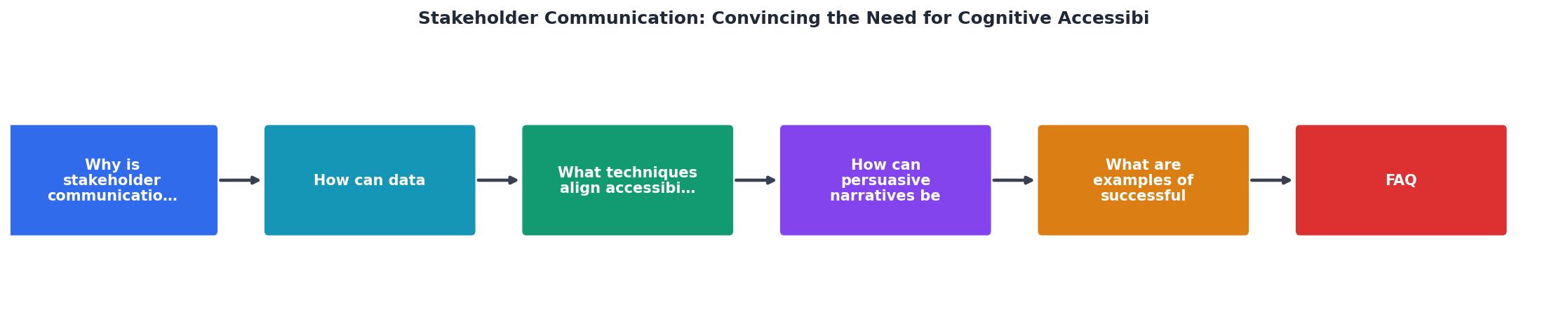
Follow the steps in the diagram: Identify Issue, Collect Data, Map to Business Goal, Build Narrative, Present to Stakeholders, and Iterate. Each step feeds the next, and the cycle repeats as you tackle additional pages or flows.
Real-world communication examples

Several approaches have proven effective across different organizational contexts:
The "before and after" demo. One e-commerce design team recorded two screen captures of the same checkout flow: one with the existing dense layout, one with a simplified prototype using plain language and progressive disclosure. They played both recordings side by side in a stakeholder meeting. The prototype version showed a 40% faster task completion time in internal testing. Budget was approved the same week.
The support cost argument. A SaaS product team pulled six months of support tickets and tagged every ticket caused by UI confusion. The total cost (agent time multiplied by hourly rate) came to a specific dollar figure per quarter. They presented this as "the confusion tax" and proposed cognitive accessibility improvements that would cost less than one quarter of support overhead.
The competitor comparison. A UX designer at an agency audited a client's onboarding flow alongside two direct competitors. They scored each flow on readability (Flesch-Kincaid grade level), number of steps, and clarity of error messages. The client's flow scored lowest on all three metrics. Presenting this as a competitive disadvantage triggered immediate action.
The following interactive card summarizes the core communication strategies and their primary impact areas, giving you a quick reference for your next stakeholder conversation:
Stakeholder Communication Strategies
Handling objections
Stakeholders push back. Expect it. Here are the three most common objections and how to address each:
"We already pass accessibility audits." Most automated audits check WCAG 2.x success criteria focused on perceivable and operable content: color contrast, keyboard navigation, screen reader compatibility. Cognitive accessibility (WCAG's "Understandable" principle and the newer COGA guidance) requires human evaluation. Passing an automated scan does not mean your content is comprehensible.
"Our users don't have disabilities." They do. Cognitive impairments include temporary states like sleep deprivation, stress, medication side effects, and multitasking. A parent filling out a form while watching a toddler has reduced cognitive bandwidth. A user on a noisy commute has diminished reading comprehension. These are your users.
"We don't have the budget." Cognitive accessibility improvements often overlap with general UX improvements. Simplifying a confusing flow benefits all users. Frame the work as "UX optimization with accessibility benefits" rather than a standalone accessibility project. Start with the highest-traffic, highest-drop-off page. One targeted fix can demonstrate ROI and unlock budget for the next.
Stakeholder Communication Narrative Template
Your progress is saved automatically in your browser.
FAQ
Frequently Asked Questions
Additional Resources
- A Stakeholder Value Framework for Augmentative and ... - Our work takes a value-sensitive design (VSD) approach to develop a stakeholder value framework that describes stakeholders' multi-dimensional roles and values.
- Stakeholders' engagement for improved health outcomes - PMC - This study aims to understand the main issues to address in developing an effective stakeholder collaborative relationship with a focus on communication.
- Introductory Guide to Cognitive Accessibility (COGA) - This blog delves into the world of cognitive disabilities, the COGA Task Force, and practical steps to make content more accessible.