Steps for Achieving ADA Compliance in Cognitive Accessibility
Most organizations treat ADA compliance as a checklist of contrast ratios and alt text. They miss the part that trips up the largest number of real visitors: cognitive accessibility. If your website confuses people with ADHD, anxiety, dyslexia, or low digital literacy, you are both excluding users and exposing your organization to legal risk. This guide walks through every step of achieving ADA compliance specifically for cognitive accessibility, from the initial audit to ongoing maintenance.

Most organizations treat ADA compliance as a checklist of contrast ratios and alt text. They miss the part that trips up the largest number of real visitors: cognitive accessibility. If your website confuses people with ADHD, anxiety, dyslexia, or low digital literacy, you are both excluding users and exposing your organization to legal risk. This guide walks through every step of achieving ADA compliance specifically for cognitive accessibility, from the initial audit to ongoing maintenance.

- ADA compliance extends beyond visual and motor accessibility to include cognitive accessibility: clear language, predictable navigation, and reduced cognitive load.
- A structured audit, practical site adjustments, and ongoing monitoring form the core compliance workflow.
- Compliance reduces legal risk, broadens your audience, and measurably improves user experience for everyone.
What ADA requires for cognition
The Americans with Disabilities Act (ADA) does not list specific technical standards in its statute. Instead, the Department of Justice has pointed to WCAG 2.1 Level AA as the benchmark for web accessibility under Title II (state and local government) and increasingly under Title III (public accommodations). WCAG 2.1 includes several success criteria that directly address cognitive accessibility:
- 1.3.5 Identify Input Purpose: form fields must communicate their purpose so autofill and assistive tools work correctly.
- 2.4.6 Headings and Labels: headings must be descriptive, not decorative.
- 3.1.1 Language of Page: the default language must be programmatically set.
- 3.3.2 Labels or Instructions: forms must provide clear instructions before submission.
- WCAG 2.2 (published in 2023) added 3.2.6 Consistent Help and 3.3.7 Redundant Entry, both targeting cognitive load.
"The Department extended the rule's compliance dates by one year.">, State and Local Governments: First Steps Toward Complying with the Americans wit
This extension gives organizations additional time, but it does not reduce the obligation. Starting now means you avoid a last-minute scramble.
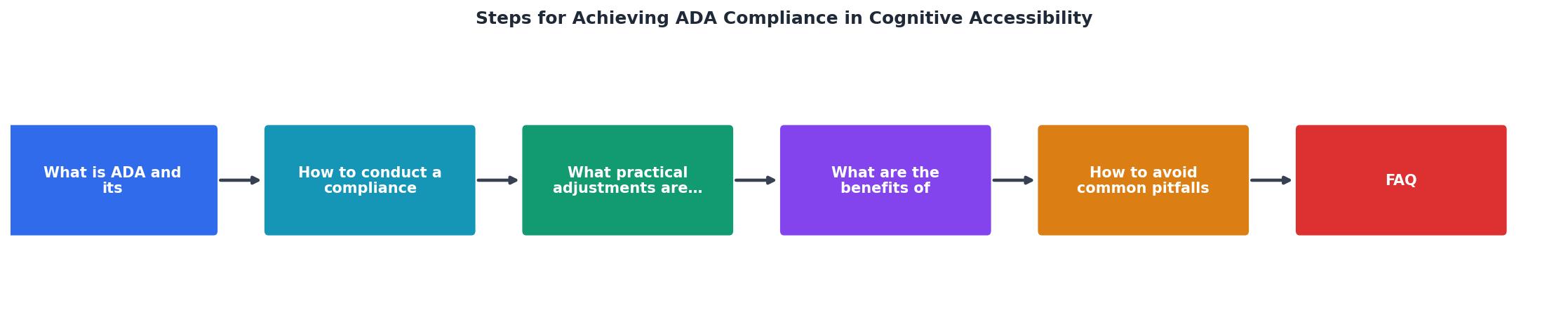
How to conduct a compliance audit
A compliance audit for cognitive accessibility follows a different rhythm than a standard automated scan. Automated tools catch contrast failures and missing alt text. They do not catch confusing navigation, ambiguous button labels, or walls of jargon. Here is the process, step by step.
1. Define scope and priorities
Start by listing every public-facing page and application. Group them by traffic volume and user impact. A checkout flow used by thousands of visitors daily gets audited before an internal knowledge base article. Prioritize:
- Landing pages and homepages
- Registration and login flows
- Checkout or application forms
- Help and support pages
- Legal and policy pages (these are often the worst offenders for readability)
2. Run automated scans first
Use tools like axe, WAVE, or Lighthouse to catch the low-hanging fruit. These tools flag missing labels, language attributes, and heading hierarchy issues. Fix those before moving to manual review. Automated scans typically catch about 30% of all accessibility issues.
3. Manual cognitive review
This is where the real work happens. A trained reviewer (or a small team) walks through each priority page and evaluates:
- Reading level: Is the content written at or below an 8th-grade reading level? Tools like Hemingway Editor or readable.com give a quick score.
- Navigation predictability: Does the menu behave consistently across pages? Are breadcrumbs present?
- Error handling: When a user makes a mistake in a form, does the error message explain what went wrong and how to fix it?
- Timeouts: Are there session timeouts that could confuse or lock out a user mid-task?
- Sensory overload: Are there auto-playing videos, carousels, or animations that cannot be paused?
4. User testing with diverse participants
Recruit participants who have cognitive disabilities, including people with ADHD, dyslexia, traumatic brain injury, and age-related cognitive decline. Even three to five participants reveal patterns that no automated tool or expert review catches. Record sessions (with consent) for stakeholder presentations.
5. Document findings in a structured report
Every finding needs four fields: the page URL, the WCAG criterion violated, a description of the barrier, and a recommended fix. This format satisfies both internal stakeholders and external auditors. Tools like PagePerson Insights can help generate structured cognitive accessibility reports that map directly to WCAG criteria.
6. Remediate and retest
Fix issues in priority order. Retest each fix against the original finding. Mark findings as resolved only after retesting confirms the barrier is gone.
Here is an example dashboard showing what a typical audit might uncover across a mid-size website:
Cognitive Accessibility Audit
Practical adjustments that work

Audit findings mean nothing without fixes. Here are the adjustments that address the most common cognitive barriers, organized by category.
Simplify language
- Rewrite body copy to an 8th-grade reading level or lower. The U.S. government's plainlanguage.gov guidelines are a solid reference.
- Replace jargon with everyday words. "Remuneration" becomes "pay." "Utilize" becomes "use."
- Break long paragraphs into chunks of two to four sentences.
- Use bullet lists for any sequence of three or more items.
Fix navigation patterns
- Keep the primary navigation in the same position on every page.
- Add breadcrumbs to every page deeper than the homepage.
- Label navigation links with specific text. "Services" is vague. "Tax Filing Services" is clear.
- Limit top-level menu items to seven or fewer. Cognitive load research (Miller's Law) shows that working memory handles about seven items.
Improve form design
- Place labels above input fields, not beside them.
- Use inline validation that triggers on blur, not on submit. Tell users what went wrong next to the field that caused the error.
- Pre-fill fields when you already have the data (WCAG 3.3.7 Redundant Entry).
- Add a progress indicator for multi-step forms. Users with anxiety or attention difficulties need to know how much remains.
Control sensory input
- Never auto-play video or audio. If you must, provide a visible pause button within the first frame.
- Allow users to disable animations site-wide. Respect the
prefers-reduced-motionCSS media query. - Avoid flashing content entirely. Beyond seizure risk, rapid visual changes increase cognitive load for users with ADHD.
Provide consistent help
WCAG 2.2's Consistent Help criterion (3.2.6) requires that help mechanisms appear in the same relative location across pages. If you have a "Contact Support" link in the footer on one page, it must be in the footer on every page. This sounds trivial. In practice, many large sites scatter help links inconsistently.
| Before (Non-Compliant) | After (Compliant) |
|---|---|
| Help link in footer on homepage only | Help link in footer on every page |
| Error says "Invalid input" | Error says "Phone number must be 10 digits" |
| 12 top-level nav items | 6 grouped nav items with clear labels |
| Auto-playing hero video | Static image with optional play button |
| Reading level: grade 14 | Reading level: grade 8 |
Benefits beyond legal protection

Compliance is the floor, not the ceiling. Organizations that invest in cognitive accessibility consistently report measurable improvements across several metrics.
Broader audience reach. Cognitive disabilities are the most common disability category. When you make your site cognitively accessible, you also help older adults, non-native speakers, stressed users, and anyone on a mobile device in a noisy environment.
Lower support costs. Clear instructions and error messages reduce support tickets. One large healthcare portal reported a 40% drop in "how do I..." calls after rewriting their forms at a lower reading level.
Improved SEO. Search engines reward clear heading structures, descriptive link text, and well-organized content. The same changes that help users with cognitive disabilities also help Google understand your pages.
Reduced legal exposure. ADA-related web accessibility lawsuits exceeded 4,000 in 2023. Cognitive accessibility gaps are increasingly cited in demand letters. Demonstrating a documented audit and remediation process is the strongest defense.
Avoiding common pitfalls
Even well-intentioned teams make predictable mistakes. Here are the ones that derail cognitive accessibility efforts most often.
- Treating it as a one-time project. Websites change constantly. New pages, updated forms, redesigned flows. Without ongoing monitoring, compliance degrades within months.
- Relying solely on automated tools. Automated scanners miss cognitive barriers. They cannot evaluate whether a sentence is confusing or whether a navigation pattern is inconsistent. Manual review is non-negotiable.
- Ignoring plain language. Legal and marketing teams often push back on simplifying language. "It sounds less professional." Readability is not about dumbing down content. It is about removing unnecessary complexity.
- Skipping user testing. Internal teams develop blind spots. They know the site too well. Real users with cognitive disabilities reveal barriers that experts miss.
- Fixing symptoms, not systems. Patching individual pages without updating templates, design systems, and content guidelines means the same problems reappear on every new page.
ADA Cognitive Accessibility Audit Checklist
Your progress is saved automatically in your browser.
FAQ
Frequently Asked Questions
Additional Resources
- State and Local Governments: First Steps Toward ... - This guide includes suggested steps that ADA Coordinators and others working with state and local governments may want to take as they plan ...
- The Ultimate Guide to Achieving ADA Compliance - The Ultimate Guide to ADA Compliance covers everything you need to know to make your websites and apps fully accessible.
- How to Achieve ADA Compliance for Websites - Get practical tips to make your website accessible, improve SEO and avoid legal hassles. Your guide to ADA compliance is here.
Need Help with Accessibility?
Improve your site's accessibility and conversion rates with our AI-powered analysis.
Get Started