Enhancing Cognitive Accessibility in Educational Platforms
Millions of students interact with online learning platforms every day, yet a significant portion of them hit invisible walls. These walls are not technical outages or broken links. They are cognitive barriers baked into the design itself, from dense paragraph blocks to confusing navigation trees to assessment interfaces that punish processing speed over actual knowledge. This guide walks through concrete strategies for making educational platforms genuinely usable for learners with cognitive disabilities, attention differences, and varying literacy levels.

Millions of students interact with online learning platforms every day, yet a significant portion of them hit invisible walls. These walls are not technical outages or broken links. They are cognitive barriers baked into the design itself, from dense paragraph blocks to confusing navigation trees to assessment interfaces that punish processing speed over actual knowledge. This guide walks through concrete strategies for making educational platforms genuinely usable for learners with cognitive disabilities, attention differences, and varying literacy levels.

- Cognitive accessibility in education means designing content, navigation, and assessments so learners with ADHD, dyslexia, anxiety, and other cognitive differences can succeed.
- Clear instructional design, adaptable content formats, and supportive assistive tools form the three pillars of an accessible educational platform.
- A repeatable audit checklist helps compliance leads document due diligence and track improvements over time.
Why cognitive accessibility matters in education
One in five students has a learning disability or cognitive difference that affects how they process information on screen. Standard WCAG audits catch contrast ratios and missing alt text. They rarely flag a 2,000-word lecture transcript with no headings, a timed quiz that penalizes slow readers, or a course menu nested six levels deep.
That number reflects a consistent finding across usability studies of learning management systems: the majority of students experience unnecessary cognitive load caused by interface design, not by the subject matter itself.
Cognitive accessibility addresses the gap between what a platform technically delivers and what a learner actually understands. It covers memory load, attention management, reading comprehension, predictability of interface behavior, and error recovery. For educational institutions subject to Section 508, the European Accessibility Act, or ADA Title II, cognitive accessibility is increasingly part of the compliance conversation.
"The accessibility issues addressed in this guidance are essential for people with certain disabilities to be able to use digital technology.">, Cognitive Accessibility at W3C
Ignoring this layer creates real risk. Students drop courses. Institutions face complaints. And the platform data shows "low engagement" when the actual problem is "incomprehensible interface."
Design clear, adaptable content
Instructional content is the core product of any educational platform. If that content is not cognitively accessible, no amount of UI polish fixes the experience.
Structure text for scanning
- Break content into chunks of 150 to 250 words per section.
- Use descriptive H2 and H3 headings that tell the learner what they will learn, not clever titles.
- Front-load key information. Put the conclusion or main point at the top of each section, then support it.
- Use numbered lists for sequential steps and bullet lists for non-sequential items.
Offer multiple content formats
A single lecture video with no transcript fails learners who process text better than audio. A text-only module fails learners who need visual demonstrations. Accessible platforms provide:
- Video with synchronized captions and a downloadable transcript.
- Audio-only versions of text content for learners who retain information better through listening.
- Visual summaries such as diagrams, infographics, or concept maps alongside written explanations.
- Interactive exercises that let learners test understanding in low-stakes environments.
Use plain language
The Flesch-Kincaid readability score of instructional text should target grade 8 to 10 for higher education and grade 5 to 7 for K-12 platforms. This does not mean dumbing down content. It means choosing "use" over "utilize," breaking compound sentences, and defining technical terms on first use.
That figure is generous. Many platforms still default to academic prose in their UI copy, help documentation, and even button labels.
Supportive tools and technologies

Good content design is the foundation. Assistive tools built into the platform extend that foundation to cover individual learner needs.
Built-in reading support
- Text-to-speech integrated at the platform level, not relying on the learner's own screen reader.
- Adjustable font size, spacing, and color themes including dyslexia-friendly fonts like OpenDyslexic.
- Dictionary and glossary pop-ups that define terms in context without navigating away from the page.
Focus and attention aids
- Progress indicators showing exactly where a learner is in a module and how much remains.
- Distraction-reduced mode that hides sidebar navigation, chat widgets, and notification badges during content consumption.
- Bookmarking and annotation tools so learners can mark where they stopped and return without re-scanning.
Flexible assessment design
Timed exams are one of the biggest cognitive accessibility failures in online education. Alternatives include:
- Extended or untimed test options configurable per student.
- Save-and-resume functionality so a learner can take breaks.
- Clear error messages on form validation that explain what went wrong and how to fix it.
- Confirmation screens before final submission.
Tools like PagePerson Insights can help identify where cognitive barriers exist on your platform pages, flagging issues like dense text blocks, confusing navigation patterns, and unclear calls to action that standard accessibility scanners miss.
Assess and improve platform accessibility

Cognitive accessibility is not a one-time fix. It requires a repeatable assessment process that documents current state, identifies gaps, and tracks remediation.
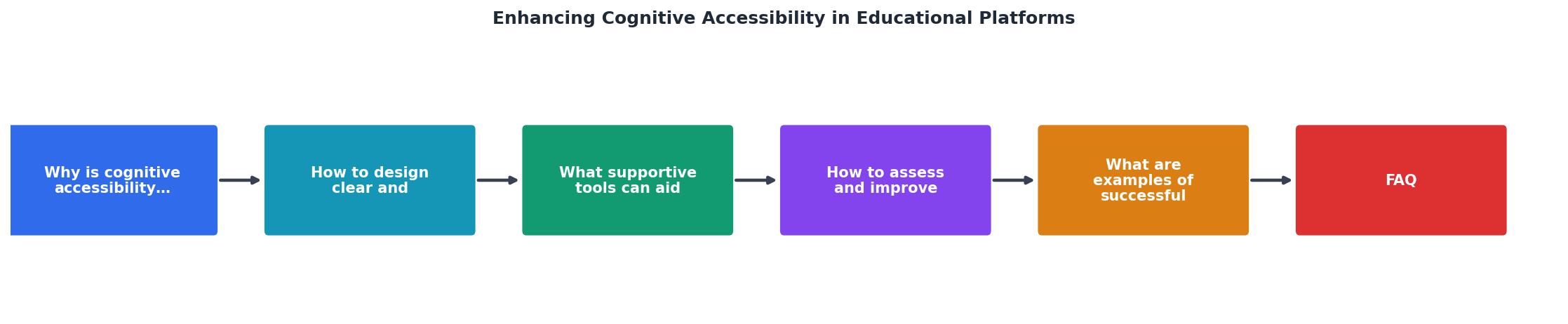
The process follows five stages: Audit, Prioritize, Remediate, Test, Monitor. Each stage feeds into the next, and the cycle repeats on a regular schedule.
Audit
Run both automated scans and manual reviews. Automated tools catch structural issues (heading hierarchy, link text, color contrast). Manual review catches cognitive issues (confusing instructions, ambiguous labels, overwhelming layouts).
Prioritize
Rank findings by impact and frequency. A confusing enrollment flow that every student hits is higher priority than a formatting issue on an archived course page.
Remediate
Assign fixes to specific teams with deadlines. Content issues go to instructional designers. UI issues go to developers. Navigation and information architecture issues need both.
Test
Validate fixes with real users, including users with cognitive disabilities. Usability testing with five to eight participants catches the majority of remaining issues.
Monitor
Track accessibility metrics over time. Useful indicators include:
- Task completion rates for key flows (enrollment, assignment submission, grade review).
- Support ticket volume related to confusion or navigation problems.
- Student satisfaction scores segmented by accommodation status.
Institutions that have invested in cognitive accessibility improvements consistently report significant drops in confusion-related support requests.
Successful implementations
Several educational institutions have made measurable progress on cognitive accessibility.
The Open University (UK) has long been a leader in inclusive design. Their platform provides content in multiple formats by default, uses consistent navigation patterns across all courses, and offers built-in study planners that break modules into manageable daily tasks. Their approach treats accessibility as a design constraint from day one, not a retrofit.
Coursera introduced a "simplified view" mode that strips course pages down to essential content, removing promotional banners, social features, and secondary navigation. Learners with ADHD and anxiety reported improved focus and completion rates in pilot studies.
Arizona State University redesigned their Canvas LMS templates to include standardized heading structures, consistent module layouts, and embedded glossaries. Faculty received training on plain language writing for online content. The result was a measurable increase in assignment completion rates across courses that adopted the new templates.
The following interactive card summarizes key accessibility metrics from institutions that have implemented cognitive accessibility improvements:
Cognitive Accessibility Impact Metrics
Educational platform accessibility checklist
Use this checklist to evaluate and track cognitive accessibility across your educational platform. Each item maps to a specific, testable criterion.
Educational Platform Cognitive Accessibility Checklist
Your progress is saved automatically in your browser.
FAQ
Frequently Asked Questions
What cognitive accessibility barrier on your educational platform has been the hardest to fix? Share your experience below.
Additional Resources
- Cognitive Accessibility and Support in Special Education - PMC - This paper describes a platform designed and developed to provide cognitive support through assistive technology services to children in special education ...
- Cognitive Accessibility at W3C - Cognitive and learning disabilities impact how people process information. For example, they can affect people's perception, memory, language, attention, ...
- A Multimodal Approach to Enhance Cognitive Accessibility ... - Experimental findings indicate improvements in learner engagement, content comprehension, and accessibility compared to traditional digital learning platforms.
Need Help with Accessibility?
Improve your site's accessibility and conversion rates with our AI-powered analysis.
Get Started