Ensuring Cognitive Accessibility on Nonprofit Organization Sites
In the digital age, nonprofit organizations rely heavily on their websites to engage with their audience and drive their mission forward. However, many nonprofit sites fall short in terms of cognitive accessibility, leaving potential supporters confused and disengaged. By simplifying donation processes, enhancing content clarity, and ensuring intuitive navigation, nonprofits can significantly improve user engagement and inclusivity.

In the digital age, nonprofit organizations rely heavily on their websites to engage with their audience and drive their mission forward. However, many nonprofit sites fall short in terms of cognitive accessibility, leaving potential supporters confused and disengaged. By simplifying donation processes, enhancing content clarity, and ensuring intuitive navigation, nonprofits can significantly improve user engagement and inclusivity.

TL;DR: Ensuring cognitive accessibility on nonprofit websites involves simplifying donation processes, enhancing content clarity, and ensuring intuitive navigation. These improvements increase user engagement and inclusivity.
Nonprofit websites serve as the digital face of organizations, offering an essential platform for communication, fundraising, and advocacy. Yet, many users encounter cognitive barriers that hinder their ability to engage effectively. Cognitive accessibility focuses on removing these barriers by making websites more understandable and easier to navigate. This approach not only broadens an organization's reach but also aligns with the mission-driven goals of inclusivity and community support.
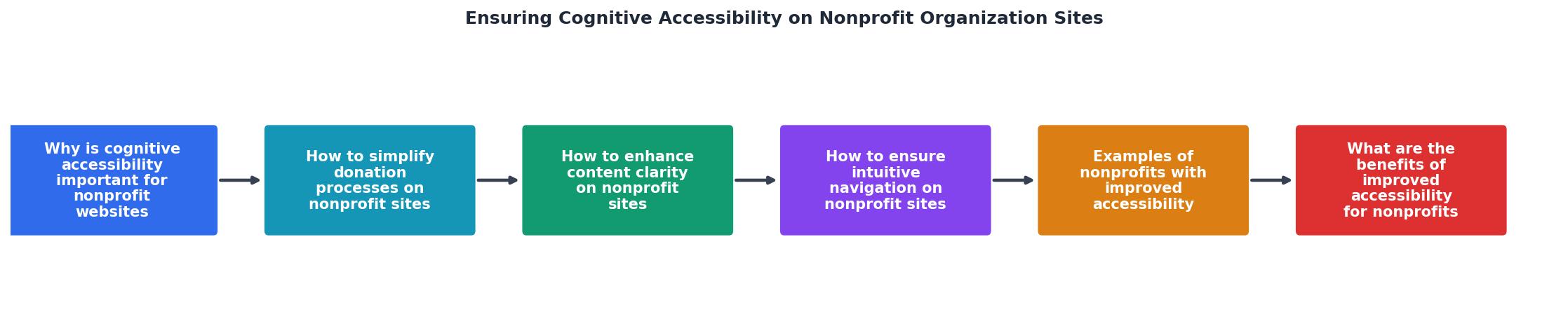
Why is Cognitive Accessibility Important for Nonprofit Websites?
Cognitive accessibility is crucial for nonprofit websites because it directly impacts user engagement and inclusivity. Individuals with cognitive disabilities, such as dyslexia or ADHD, often face challenges that prevent them from fully accessing digital content. By addressing these issues, nonprofits can ensure that their message reaches a wider audience and that potential supporters can easily engage with their cause.
Moreover, cognitive accessibility enhances the overall user experience, making it easier for all visitors to navigate the site, understand the content, and complete desired actions, such as making a donation or signing up for a newsletter.
How to Simplify Donation Processes on Nonprofit Sites?
Simplifying the donation process is a critical step in ensuring cognitive accessibility. A convoluted or confusing donation interface can deter potential donors, particularly those with cognitive impairments.

Here are some techniques to create a user-friendly donation interface:
- Streamlined Forms: Use clear, straightforward language and minimize the number of fields required to complete a donation. This reduces cognitive load and speeds up the process.
- Visual Cues: Utilize icons and progress indicators to guide users through the donation process. Visual cues help users understand what to expect and where they are in the process.
- Mobile Optimization: Ensure that donation forms are mobile-friendly, as many users will access the site from a smartphone or tablet.
- Accessible Payment Options: Offer multiple payment options, including credit cards, PayPal, and other digital wallets, to accommodate different user preferences.
How to Enhance Content Clarity on Nonprofit Sites?
Content clarity is another essential aspect of cognitive accessibility. Clear and concise content helps users understand the information presented and engage more effectively with the site.

Strategies for Enhancing Content Clarity:
- Use Plain Language: Avoid jargon and complex terminology. Instead, use plain language that is easy to understand for a broad audience.
- Break Up Text: Use headings, bullet points, and short paragraphs to make content more digestible. This also helps users scan the page quickly.
- Provide Summaries: Include summaries at the beginning of long articles or reports to give users a quick overview of the content.
- Incorporate Multimedia: Use images, videos, and infographics to complement text and provide alternative ways to understand the content.
How to Ensure Intuitive Navigation on Nonprofit Sites?
Intuitive navigation is key to a positive user experience. Users should be able to find what they are looking for quickly and easily, without feeling overwhelmed.

Best Practices for User-Friendly Site Navigation:
- Consistent Menus: Use a consistent menu structure across all pages to help users know where to find information.
- Breadcrumb Trails: Implement breadcrumb trails to show users their location within the site hierarchy, making it easier to navigate back to previous pages.
- Search Functionality: Include a search bar prominently on the site to allow users to quickly find specific content.
- Responsive Design: Ensure that the site is responsive and functions well on different devices and screen sizes.
Examples of Nonprofits with Improved Accessibility
Several nonprofit organizations have successfully improved their cognitive accessibility, leading to greater user engagement and mission success. For example:
- Charity: Water streamlined their donation process, making it easy for supporters to contribute with just a few clicks.
- The Nature Conservancy enhanced content clarity by using plain language and providing multimedia resources to better convey their conservation efforts.
- World Wildlife Fund improved navigation with a clear, consistent menu and search functionality, allowing users to easily explore their site.
What are the Benefits of Improved Accessibility for Nonprofits?
Improving cognitive accessibility on nonprofit websites offers several advantages:
- Increased Engagement: By making it easier for users to navigate and understand content, nonprofits can increase user engagement and participation.
- Broader Reach: Ensuring accessibility allows organizations to reach a wider audience, including individuals with cognitive disabilities.
- Enhanced Reputation: Demonstrating a commitment to inclusivity and accessibility can enhance an organization's reputation and credibility.
Checklist for Ensuring Cognitive Accessibility on Nonprofit Websites
Checklist for Cognitive Accessibility
Your progress is saved automatically in your browser.
FAQ
Frequently Asked Questions
In what ways have you found cognitive accessibility improvements beneficial for your nonprofit website? Share your thoughts and experiences in the comments below.
Additional Resources
- How to Make Your Nonprofit Website WCAG 2.2 Compliant - The top nonprofit websites use the WCAG 2.2 regulations to guide their online accessibility strategies. This guide explores the basics of WCAG ...
- The Importance of Accessibility on Nonprofit Websites - An accessible website is crucial for nonprofit organizations to inclusively connect with their community, improve engagement, and meet legal ...
- Website Accessibility for Nonprofit Organizations - We offer comprehensive accessibility audits and user testing. Get personalized remediation guidance and assistance fixing errors in your plugins or WordPress ...
Need Help with Accessibility?
Improve your site's accessibility and conversion rates with our AI-powered analysis.
Get Started