Documenting Cognitive Accessibility Compliance for Legal Safety
Most organizations treat accessibility documentation as an afterthought, something to assemble when a complaint arrives. By then it is too late. A well-maintained compliance documentation trail is the single most effective shield against accessibility lawsuits, and it costs far less to build proactively than to reconstruct under legal pressure. This guide walks through the exact document types, structures, and templates you need to prove cognitive accessibility due diligence before anyone asks.

Most organizations treat accessibility documentation as an afterthought, something to assemble when a complaint arrives. By then it is too late. A well-maintained compliance documentation trail is the single most effective shield against accessibility lawsuits, and it costs far less to build proactively than to reconstruct under legal pressure. This guide walks through the exact document types, structures, and templates you need to prove cognitive accessibility due diligence before anyone asks.

- Cognitive accessibility compliance documentation protects your organization from ADA, Section 508, and European Accessibility Act litigation by proving ongoing due diligence.
- You need five core document types: an accessibility policy statement, audit reports, remediation logs, testing records, and a Voluntary Product Accessibility Template (VPAT) or equivalent.
- Update documents quarterly at minimum, and after every significant site change.
Why documentation decides lawsuits
Accessibility lawsuits in the United States exceeded 4,600 federal filings in 2023, and the trend keeps climbing. Courts do not expect perfection. They look for evidence that an organization recognized its obligations, assessed its digital properties, and took reasonable steps to fix issues. Without documentation, you cannot demonstrate any of that.
Cognitive accessibility sits in a particularly risky spot. WCAG 2.2 Level AA now includes success criteria that touch cognitive load, consistent navigation, and error prevention. The European Accessibility Act (EAA), enforceable from June 2025, explicitly covers comprehension and ease of use. Regulators and plaintiffs are catching up to what designers have known for years: a site can pass every contrast check and still be unusable for someone with ADHD, dyslexia, or anxiety.
Documentation transforms "we tried" from a vague claim into a verifiable fact. It shifts the legal conversation from "did you comply?" to "did you act in good faith?" Courts in the U.S. have repeatedly accepted documented remediation plans as evidence of good faith, even when full compliance was not yet achieved.
Five document types you need

Not every piece of paper carries the same weight. Here are the five categories that form a complete compliance documentation set for cognitive accessibility:
- Accessibility Policy Statement - A public-facing declaration of your organization's commitment to accessibility, including cognitive accessibility. It names the standards you follow (WCAG 2.2 AA, EN 301 549, Section 508) and provides a contact method for reporting barriers.
- Audit Reports - Periodic assessments of your digital properties against specific success criteria. For cognitive accessibility, these cover readability scores, navigation consistency, form error handling, and content structure.
- Remediation Logs - Timestamped records of identified issues and the fixes applied. Each entry links an audit finding to a specific code change, design update, or content revision.
- Testing Records - Evidence of usability testing with participants who have cognitive disabilities, or structured cognitive walkthroughs conducted by trained evaluators.
- VPAT / Accessibility Conformance Report - A standardized template (typically VPAT 2.5 for U.S. contexts or EN 301 549 Annex C for EU) that maps your product's conformance level to each applicable criterion.
Only about 35% of organizations that claim accessibility compliance actually maintain all five document types. The gap is your risk, and your opportunity to stand out.
How to structure compliance documents

A compliance document that a lawyer cannot parse is a compliance document that fails in court. Structure matters as much as content.
Audit report structure
Every audit report should contain these sections in this order:
- Executive Summary - One paragraph stating scope, date, standards tested, and overall conformance level.
- Scope Definition - Exact URLs, user flows, and assistive technologies tested. For cognitive accessibility, list the cognitive profiles considered (e.g., low reading literacy, ADHD, anxiety).
- Methodology - Tools used (automated scanners, manual checklists, cognitive walkthroughs), evaluator qualifications, and testing environment.
- Findings Table - Each issue gets a row: criterion reference, severity (critical/major/minor), page/component affected, description, and recommended fix.
- Conformance Summary - A matrix mapping each WCAG success criterion to a status: Supports, Partially Supports, Does Not Support, or Not Applicable.
- Sign-off - Name, role, and date of the person responsible for the audit.
Remediation log structure
Keep remediation logs in a spreadsheet or issue tracker with these columns:
- Issue ID (links to audit finding)
- Date identified
- WCAG criterion
- Severity
- Responsible team member
- Fix description
- Date resolved
- Verification method
- Verified by
The documentation process step by step
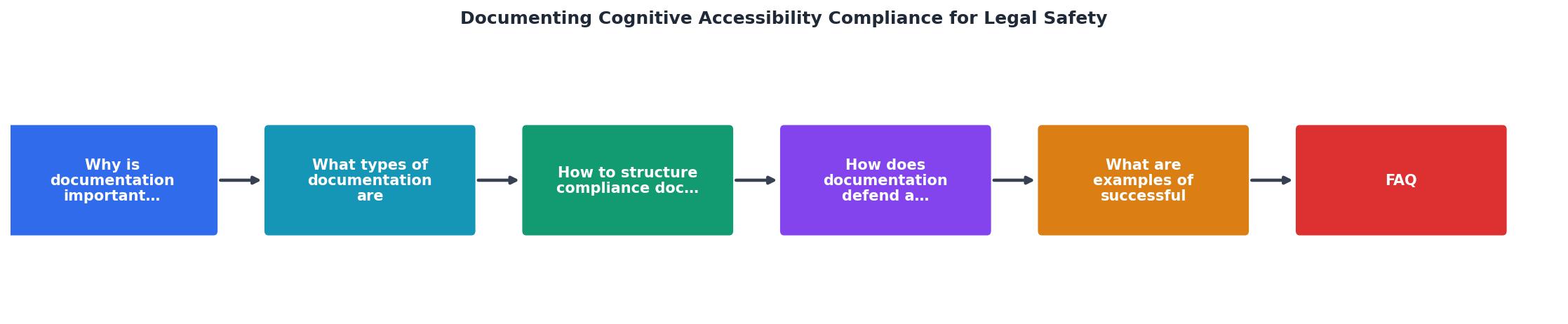
The diagram above outlines the core loop. Here is how each step works in practice:
- Define scope - Identify which pages, flows, and user populations your audit covers. Prioritize high-traffic pages and conversion-critical flows first.
- Run audit - Combine automated scanning with manual cognitive walkthroughs. Automated tools catch structural issues (heading hierarchy, link purpose). Manual review catches cognitive barriers (confusing language, inconsistent navigation patterns, overwhelming form layouts).
- Log findings - Record every issue in the findings table with its WCAG criterion reference. For cognitive items, reference WCAG 2.2 criteria like 3.2.6 (Consistent Help), 3.3.7 (Redundant Entry), or the Cognitive Accessibility Guidance from the W3C's COGA task force.
- Prioritize fixes - Assign severity based on user impact and legal exposure. A confusing checkout flow on an e-commerce site is critical. A slightly verbose "About Us" page is minor.
- Remediate - Fix issues and document each change in the remediation log.
- Verify - Re-test fixed items. Record verification in the log.
- Update VPAT - Refresh your conformance report to reflect the new state.
- Schedule next cycle - Set the next audit date. Quarterly is the standard cadence; monthly for high-risk industries like finance and healthcare.
How documentation defends you

Three legal scenarios show why documentation changes outcomes:
Demand letter from a serial plaintiff
Serial ADA plaintiffs target organizations without public accessibility statements. A published policy statement with a feedback mechanism often prevents the initial filing. When a demand letter does arrive, your remediation log shows active, ongoing work. Many plaintiff attorneys will settle quickly or drop the case when they see a documented good-faith effort.
Regulatory inquiry under the EAA
European regulators enforcing the EAA will request evidence of conformance. An EN 301 549 conformance report, combined with audit records and testing documentation, satisfies the "due diligence" requirement. Without these, you face enforcement action even if your site is technically accessible.
Internal risk assessment
Legal and procurement teams at enterprise clients increasingly require accessibility documentation before signing contracts. A complete VPAT and audit history shortens sales cycles and opens doors to government contracts that mandate Section 508 compliance.
"The resulting number of wheelchair spaces must be located in no fewer than 20% of the boxes covered by this section.">, ADA Accessibility Standards
This quote from the ADA standards illustrates how specific compliance requirements get. Cognitive accessibility criteria are heading in the same direction. Documenting your conformance to each specific criterion, not just a general "we care about accessibility" statement, is what holds up under scrutiny.
Examples of effective documentation
| Weak Documentation | Strong Documentation |
|---|---|
| "We tested our site for accessibility" | "On 2026-03-15, evaluator J. Chen conducted a WCAG 2.2 AA audit of 47 pages using axe-core 4.9 and manual cognitive walkthrough" |
| "Issues were found and fixed" | "Issue #142: WCAG 3.2.6 - Help link absent from checkout flow. Fixed 2026-03-22 by adding persistent help widget. Verified 2026-03-24 by M. Torres" |
| "Our site is accessible" | "Conformance level: Partially Supports WCAG 2.2 AA. 94 of 102 applicable criteria fully supported. 8 criteria partially supported with remediation scheduled for Q3 2026" |
| No testing records | "Cognitive walkthrough conducted with 5 participants (2 with ADHD, 1 with dyslexia, 2 neurotypical controls) on 2026-02-10. Session recordings stored in [secure location]" |
Real-world template: audit finding entry
Here is what a single finding looks like in a well-structured audit report:
- Finding ID: COG-2026-047
- Criterion: WCAG 2.2 SC 3.3.7 (Redundant Entry)
- Page:
/checkout/shipping - Severity: Major
- Description: Users must re-enter their shipping address on the billing page even when "same as shipping" is selected. This creates unnecessary cognitive load and increases error rates for users with memory difficulties.
- Recommendation: Auto-populate billing fields when "same as shipping" is checked. Persist the selection across page reloads.
- Status: Open
- Assigned to: Frontend team
- Target fix date: 2026-04-15
Compliance Documentation Status
Compliance documentation checklist
Use this checklist to verify your documentation set is complete before your next review cycle:
Cognitive Accessibility Compliance Documentation Checklist
Your progress is saved automatically in your browser.
FAQ
Frequently Asked Questions
Additional Resources
- ADA Accessibility Standards - This document contains scoping and technical requirements for accessibility to sites, facilities, buildings, and elements by individuals with disabilities.
- Unpacking Document Accessibility: Risks and Best Practices - Prioritizing document accessibility is essential for organizations to reduce legal risk and support inclusive user experiences.
- Guidance on Web Accessibility and the ADA - This guidance describes how state and local governments and businesses open to the public can make sure that their websites are accessible to people with ...
Need Help with Accessibility?
Improve your site's accessibility and conversion rates with our AI-powered analysis.
Get Started