Incorporating User Feedback into Compliance Reports
User feedback transforms compliance reports from static checklists into living evidence of genuine accessibility commitment. Most organizations treat compliance documentation as a box to tick, a list of technical standards met, screenshots attached, filed away. But regulators, stakeholders, and disabled users themselves see through that. When you incorporate real feedback from people who actually use your website, your compliance report becomes credible, defensible, and actionable.

Photo by Jakub Zerdzicki from Pexels
User feedback transforms compliance reports from static checklists into living evidence of genuine accessibility commitment. Most organizations treat compliance documentation as a box to tick, a list of technical standards met, screenshots attached, filed away. But regulators, stakeholders, and disabled users themselves see through that. When you incorporate real feedback from people who actually use your website, your compliance report becomes credible, defensible, and actionable.
TL;DR:- Incorporating user feedback into compliance reports demonstrates authentic commitment to accessibility and strengthens your position with regulators and users.
- Collect feedback through multiple channels (user testing, surveys, support tickets) and analyze it for patterns that reveal cognitive and usability barriers.
- Document feedback systematically in your compliance framework by mapping user insights to WCAG criteria, regulatory standards, and remediation timelines.
- Use feedback to show not just what you fixed, but why you fixed it and how real users benefited, turning compliance into credibility.
Why Include User Feedback?

Technical compliance audits catch missing alt text and color contrast failures. They don't catch cognitive friction, the moment a visitor with ADHD loses focus because your copy is dense, or a dyslexic user gives up because your form labels are unclear, or someone with low digital literacy can't parse your navigation. Feedback from real users reveals those gaps.
When you document this feedback in your compliance report, you do several things at once. First, you prove that you tested with actual disabled users, not just ran an automated scanner. Second, you create a paper trail showing you identified barriers and fixed them. Third, you align your accessibility effort with real outcomes, not just technical boxes.
Organizations that integrate user feedback into compliance reports also build stronger stakeholder buy-in internally. When developers see a support ticket from a user with dyslexia describing how your form confused them, it lands differently than a WCAG criterion number. Feedback humanizes the work and makes the business case for accessibility investment obvious.
Collecting and Analyzing User Feedback

Effective compliance reports pull feedback from multiple sources. A single user testing session isn't enough; regulators want patterns.
Set up a structured collection process:
- User testing sessions, Conduct moderated or unmoderated tests with 8-12 users who have disabilities (ADHD, dyslexia, mobility impairments, cognitive disabilities, etc.). Record where they struggle and why.
- Support tickets and customer emails, Tag and categorize accessibility-related complaints. A spike in "I can't find the checkout" or "Your form is confusing" is data.
- Surveys, Ask users directly: "Did you find this page easy to understand?" "Did the navigation make sense?" "What would help you use this site better?"
- Analytics and session replay, Look for patterns: high drop-off on certain pages, repeated clicks on non-clickable elements, time spent on forms.
- Accessibility feedback channels, Set up a dedicated email or form where users can report barriers. Make it visible and easy to use.
"These changes led to a 40% reduction in the time users spent searching for recordings and a significant increase in user satisfaction ratings.">, The Role of User Feedback in Shaping Compliance Recording Tools
Prioritize feedback by severity and frequency. A barrier that one user encounters is worth noting. A barrier that affects 30% of your testers is urgent and must appear in your compliance report as evidence of a known issue and your remediation plan.
Documenting Feedback in Compliance Frameworks

The key to defensible compliance is linking user feedback directly to standards and fixes. Here's how to structure it:
Map feedback to WCAG and regulatory requirements. If users report that your form labels are confusing, link that to WCAG 2.1 Criterion 3.3.2 (Labels or Instructions). If users with cognitive disabilities say your navigation is unpredictable, tie that to Criterion 3.2.3 (Consistent Navigation).
Document the barrier clearly. Describe what the user encountered, who encountered it, and the frequency. Example: "3 of 8 users with dyslexia reported difficulty scanning form field requirements due to inconsistent label styling and lack of visual hierarchy."
Show the remediation. What did you do to fix it? "Redesigned form labels with larger, bolder font; added visual indicators (red asterisks) for required fields; tested with 5 dyslexic users post-launch and confirmed ease of use improved."
Include outcomes. Did the fix work? How do you know? "Post-launch testing: 5 users with dyslexia completed the form without additional help, with average completion time of 2 minutes vs. 5 minutes pre-fix."
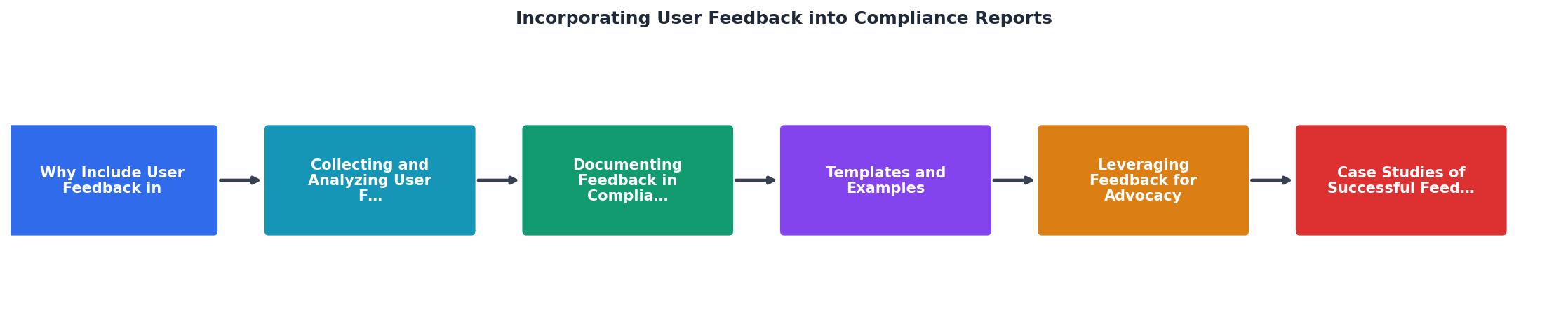
This approach, feedback → barrier identification → standards mapping → fix → outcome, is what regulators want to see. It proves you didn't just run a tool and check a box. You listened, analyzed, fixed, and measured.
Templates and Examples
A solid compliance report template includes dedicated sections for user feedback and outcomes:
Section: Accessibility Testing & User Feedback
- Testing methodology (who tested, when, how many participants, disabilities represented)
- Barriers identified (linked to WCAG criteria)
- User quotes or session summaries (anonymized)
- Remediation actions taken
- Post-remediation verification
Barrier: Users with cognitive disabilities reported difficulty understanding the purpose of form fields because labels were unclear and instructions were hidden in help text.
Standard: WCAG 2.1 Criterion 3.3.2 (Labels or Instructions)
Testing detail: 4 of 6 users with ADHD failed to complete the form without asking for help. Feedback: "I don't know what you're asking for here."
Fix: Rewrote all form labels with clear, plain language. Moved required-field indicators inline. Tested with 5 users post-launch.
Outcome: 5 of 5 post-launch testers completed the form without assistance.
Leveraging Feedback for Advocacy
User feedback isn't just for compliance documents. It's a tool for internal advocacy and public transparency.
Share feedback findings with stakeholders to justify accessibility investment. When the CEO sees "Users with low vision report difficulty with our color contrast; 2 complained in support last quarter," budget approvals move faster than when you cite a WCAG criterion alone.
Use feedback to prioritize remediation. If users report that three key barriers block their use of your site, those become your priority fixes. Regulators and plaintiffs will ask why you fixed low-impact issues before high-impact ones. Feedback data answers that question.
Consider publishing an accessibility statement that references user feedback. Transparency builds trust. "We conducted user testing with 12 disabled individuals, identified three barriers, and fixed them within 6 weeks" is credible. Generic accessibility statements are not.
Case Studies of Successful Feedback Integration
Several organizations have strengthened their compliance posture by systematically integrating user feedback:
E-commerce platform: After user testing revealed that customers with dyslexia struggled with dense product descriptions, the company rewrote descriptions using plain language and bulleted key features. Feedback integration into their accessibility report showed regulators a documented, outcome-driven approach. Support tickets for "I can't understand the product" dropped 60%.
Financial services site: User feedback identified that form-completion rates were lower for users with cognitive disabilities. The organization redesigned forms to break them into smaller steps, simplified language, and added progress indicators. The compliance report documented each change against WCAG Criterion 3.3 and showed post-remediation usability testing results.
SaaS product: Testers with low digital literacy reported that the onboarding flow assumed too much prior knowledge. The company created context-sensitive help, added field-by-field guidance, and simplified terminology. Compliance documentation included user quotes (anonymized) and evidence of improved task success rates.
In each case, the organization's compliance report shifted from "we checked these boxes" to "we listened, learned, and improved based on real user experience."
Interactive compliance feedback tracking is essential for staying organized. Below is a template you can adapt to structure your feedback collection and compliance documentation:
Steps for Collecting and Documenting User Feedback in Compliance Reports
Your progress is saved automatically in your browser.
User Feedback to Compliance Documentation
This visual flow shows how feedback moves through your compliance process. Each step builds credibility: collection proves you're listening, analysis shows rigor, mapping demonstrates standards alignment, documentation creates accountability, remediation shows action, and verification proves outcomes.
FAQ
Frequently Asked Questions
The integration of user feedback into compliance documentation represents a fundamental shift in how organizations approach accessibility. It moves the work from a checklist exercise into a genuine commitment to inclusion, backed by evidence and measured by real user outcomes. Your compliance report becomes not just a defensive document but a proof of principle: that accessibility matters because real people's experiences matter.
Additional Resources
- The Role of User Feedback in Shaping Compliance ... - TC&C - Understanding and incorporating user feedback can lead to significant improvements in compliance recording tools, enhancing their effectiveness ...
- What is compliance reporting? Benefits and best practices - Compliance reporting helps you demonstrate your commitment to responsible operations to customers and investors, and improve business reputation in the process.
- 10 Ways User Feedback Can Transform Your Compliance ... - User feedback can profoundly transform compliance processes, enhancing efficiency, accuracy, engagement, training, and trust. Actively seeking ...
Need Help with Accessibility?
Improve your site's accessibility and conversion rates with our AI-powered analysis.
Get Started